- Control Panel
- Insulation Monitoring Module
- Card Reader
- Charging Pile Communication Module
- Charging Pile Test Control Guidance Device
- Smart Charging Pile Backend Operation Management System
- Smart Charging Pile LAN Backend Management System
- Dry Valley New Energy 7-360KW Charging Pile
- Dry Valley New Energy QGAC220 Series AC Charging Pile
- Dry Valley New Energy QGDC750 series DC Charging Pile
- Qiangu New Energy QGDC700-B Series DC Charger (Portable Pile)
- DC Load Box
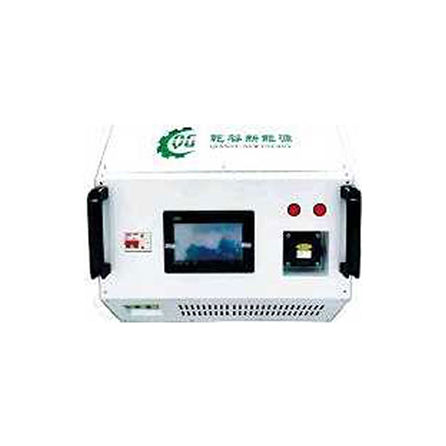
DC charging pile test system
2020/10/16
1. Product introduction
The DC charging pile test system exchanges information with the electric vehicle DC charging pile through the internal BMS simulator to realize real-time simulation of the battery charging process. When the DC charger charging gun is connected to the test equipment interface, the test equipment complies with the non-vehicle charger and BMS communication protocol national standard (GB/T 27930-2011 (old national standard) and GB/T 27930-2015 (new national standard)) completes connection detection, identification detection, handshake detection, configuration detection, charging detection and end of charging detection, and simultaneously displays charging voltage and current, auxiliary power supply voltage, etc. This test system integrates an 8KW resistive load. Customers can expand the load through the external load interface to meet high-power testing requirements.
This test system uses a 7.0-inch touch screen, which is easy to operate and intuitive to display.
2. Function introduction

1) Main interface function
A) Display charging, voltage, power and battery capacity
B) Display simulator status
C) Display the connection status of the gun
D) Display BMS power supply voltage and communication status
E) Simulate 6 types of faults
F) Set BMS demand voltage and current, etc.
G) Simulate various battery states, parameters, faults, etc.
2) Other parameter functions
A) Test the message cycle sent by the charging pile
B) Simulate battery failure
C) Battery status parameter setting
3. Technical parameters
A) Working power supply: 220VAC±15%
B) Charging voltage range: 0V~750VDC
C)Charging current range: 0V~10A
D)BMS power supply voltage range: 0V~30VDC (normal 12V±10%, 24V±10%)
E) Insulation fault simulation resistance: 30K
F) Load box power: 8KW (load resistance 75Ω)
G) External expansion power: 60KW
H) External expansion current: 80A
I)Heating method: air cooling
3. Instructions for use
1) Power supply
This device requires an external 220V±10%AC AC power supply. Connect L, N, and PE to the power supply terminals respectively. At the same time, close the miniature circuit breaker on the panel. At this time, the touch screen lights up and the system enters the working state.
2) Test function
A) Before testing, first select the old national standard (GB2011) and the new national standard (GB2015).
B) Select the shortcut key (450V.30A) (750V.30A) in parameter settings. If customers want to customize parameters, they can directly set the parameters above. At this time, the shortcut key parameters will have no effect.
C) Insert the gun into the test device interface, start the charging pile, and the test officially begins. At this time, the BMS status changes from "idle" to charging. When entering the charging stage, the status changes to "stop charging". At this time, you can click this button to terminate the test. If the charging pile actively terminates charging or simulates a fault to terminate charging, the BMS status will automatically return to the original "idle". Tests can be started continuously without setting parameters.
D) Select the fault simulation column to simulate various faults. At this time, the charging pile will generate various corresponding faults.
E) If you set other parameters, you can enter "Other Parameters" to simulate various faults.
F) This device can measure the sending cycle of each message of the charging pile. The cycle measurement is to send at least 2 messages. Otherwise, the cycle may be 0, which is normal.
G) During normal testing, when DC+ and DC- have voltage output, the two indicator lights on the panel will light up. When there is no voltage, the indicator light goes out.
3) External power load
A) This device provides an external load interface. The rated maximum operating current of the external load is 80A, the rated maximum output voltage is 750V, and the interfaces are DC+ and DC-. If you need a power load greater than 80A, please indicate when ordering.
B) The external load does not have an anti-backflow function, so be careful to prevent backflow power from entering. 4. Precautions
1) This device generates heat when working, and the shell temperature is relatively high. Be careful about burns when using it! When the device is working, someone must monitor it and pay attention to ventilation to prevent fire!
2) When the external expansion interface is working, there is a DC high-voltage output, so be careful to prevent electric shock!
3) Do not exceed the rated working range of this device or overload it!
4) This device integrates a power resistor and is fragile. Please do not carry it violently!
5) This device provides free software upgrades!
6) One-year warranty!

Hefei Qiangu New Energy Technology Co., Ltd. All rights reserved Anhui ICP No. 17002575-1Disclaimer